How To
Copyright © 2020 Polymail, Inc.
Every additional scheduling tool adds another tab, another subscription, another login, and another workflow your team has to maintain.
Most founders already live inside their inbox. That is where investor conversations happen, sales cycles advance, candidates are interviewed, customers ask for help, and partnerships are negotiated.
Scheduling should happen there too.
Polymail's integrated Calendar and Meetings features remove the need to jump between your email client and a separate scheduling platform. Instead of leaving your inbox every time someone needs to book time, scheduling becomes another part of the conversation.
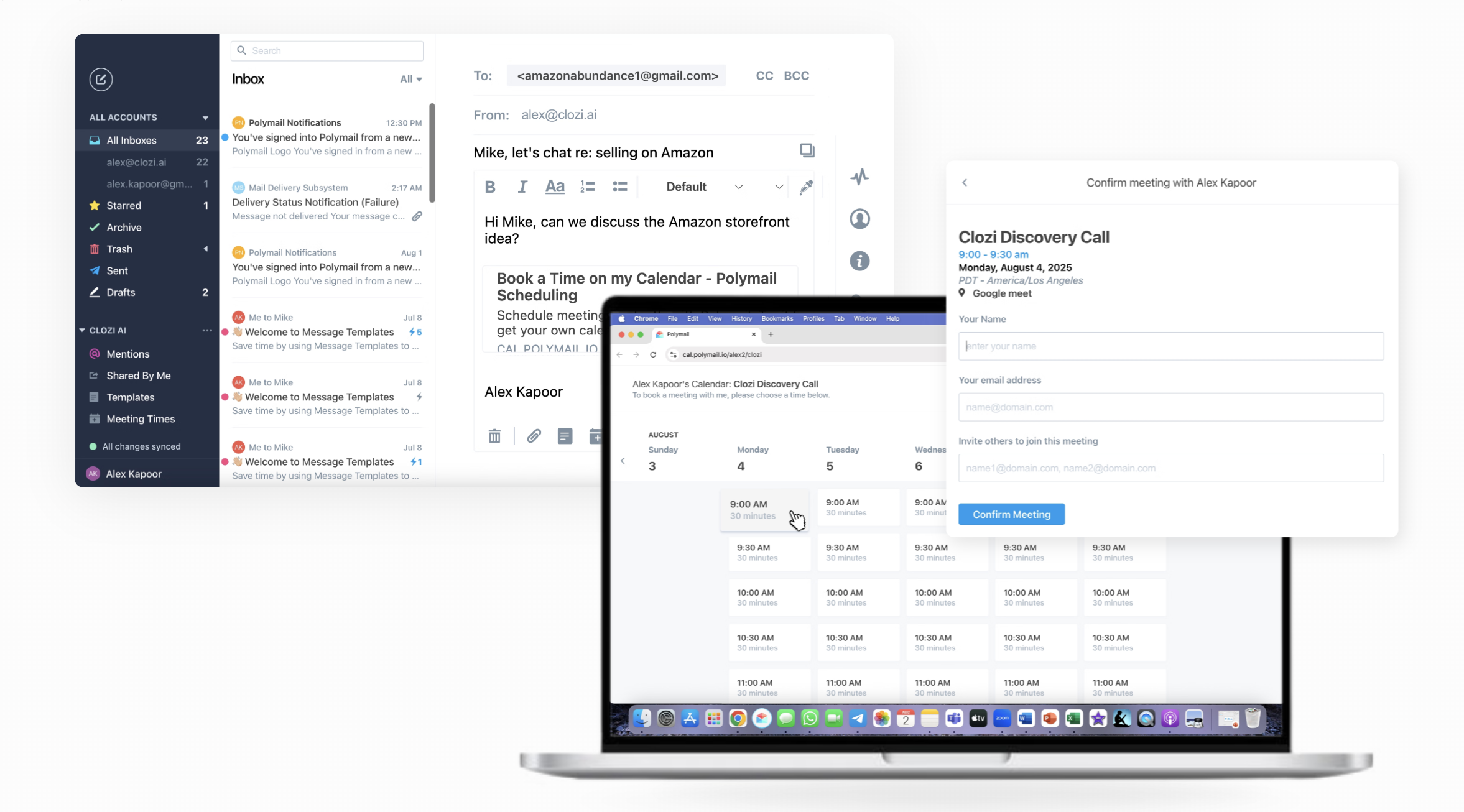
Here's how to build a founder workflow around it.
Instead of sharing one generic booking page, you can create scheduling pages around the conversations you actually have.
Examples:
Each meeting type can have its own duration, availability, meeting location, calendar, conferencing provider, and booking rules.
That means your fundraising conversations can have different availability than customer demos or recruiting interviews.
More importantly, each meeting type can have its own availability windows. You can reserve Tuesday mornings for investor meetings, Wednesday afternoons for customer demos, and Friday mornings for interviews. Every booking is automatically routed into the right part of your week, keeping your calendar organized without any manual effort.
Open Meeting Times and create a new availability.
From there you can configure:
You also receive a dedicated booking URL for that meeting type.
The result is multiple scheduling pages that match the way you actually run your business instead of forcing every conversation into one generic calendar.
Most scheduling tools stop at "pick a time." Founders need more protection than that.
Inside each availability you can configure:
For example:
Instead of manually defending your calendar every day, Polymail enforces those rules automatically.
Sometimes a full booking page is unnecessary.
For example, if you're already having an email conversation, instead of writing "What time works for you?" or "Here's my Calendly," you can just insert available meeting times directly into the email. The recipient simply makes two clicks to choose a good slot.
There is no calendar screenshots, no back-and-forth, no separate scheduling email.
Scheduling remains inside the thread where the conversation already exists.
I've seen this be most useful for:
The meeting becomes a natural continuation of the conversation rather than a context switch.
Inside the composer:
Your recipient clicks the link, sees available times in a browser tab, and selects the best time for them.
Not every meeting should require a scheduling page.
Sometimes someone emails:
Tuesday at 10?
Instead of opening Google Calendar...
...creating the event...
...copying the invite...
...returning to email...
...and confirming manually...
You can build the meeting directly inside Polymail's composer.
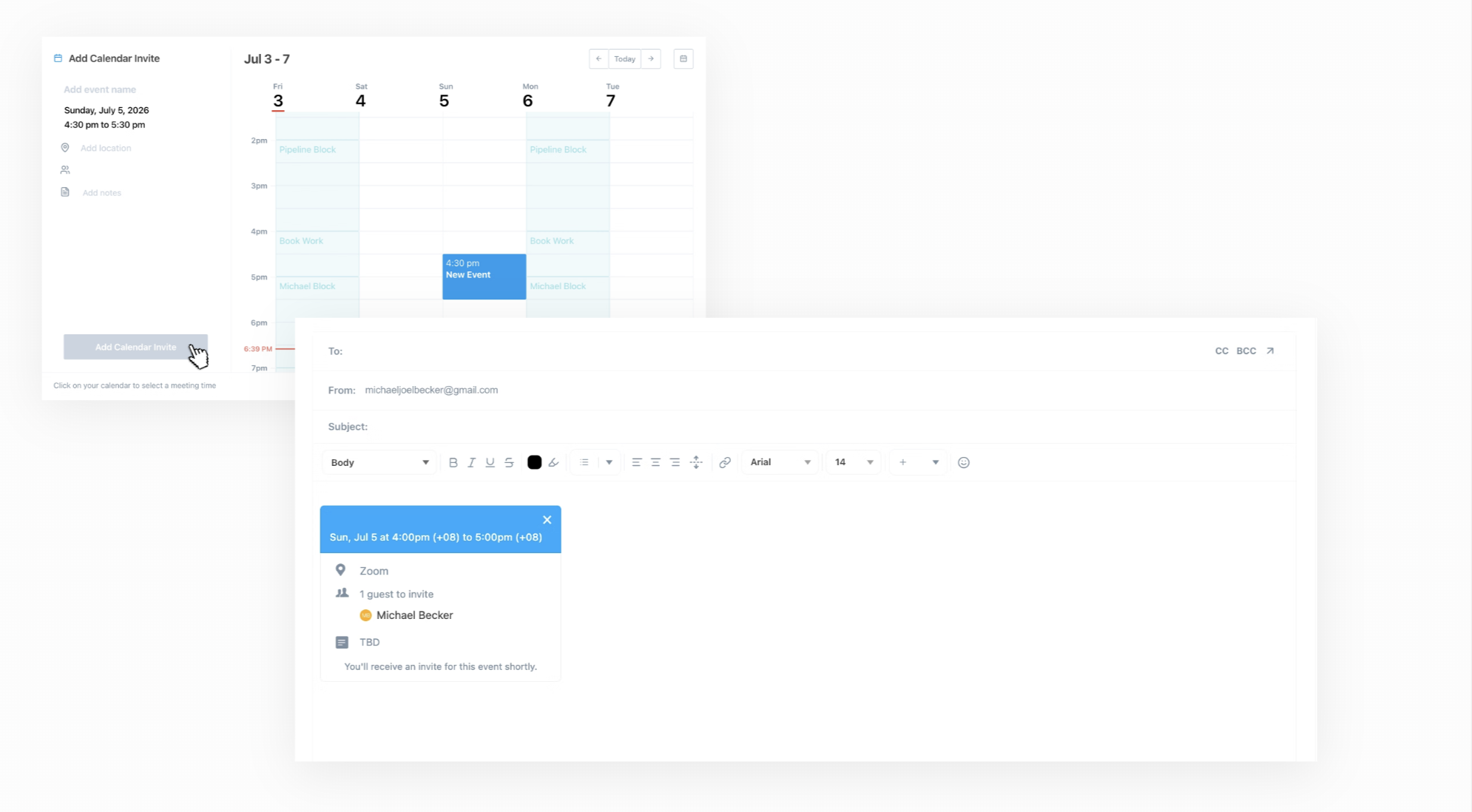
Select:
Calendar icon → Send Calendar Invite
Then configure:
When you finish, Polymail inserts the complete meeting invitation directly into the email.
The invite becomes part of the message itself.
Once sent, attendees receive the calendar invitation automatically.
There is no second workflow.
The biggest productivity gain here, for me, is eliminating context switching. Without an integrated workflow, you're constantly bouncing between: Email → Calendar → Scheduling tool → Back to email. Every micro switch breaks focus.
With Polymail, the entire workflow happens from the composer.
You can reply to the conversation, propose meeting times, create the meeting, send the invite, and continue the thread without opening another application.
Different conversations call for different scheduling workflows.
Create as many meeting types as you like for every type of event (no meeting type cap like Calendly). Then, when you want someone to book at their convenience, share your Meeting Page. When both sides have already agreed on a specific time or you want to proactively propose a time, create and send the calendar invite directly from the composer without ever leaving your inbox.
Each method keeps scheduling inside the conversation instead of forcing people into unnecessary back-and-forth.
A practical workflow might look like this:
Inbound lead
→ Reply with your Customer Demo meeting page.
Investor requests time next week
→ Insert available meeting times link into the email.
Customer replies "Tuesday at 10 works."
→ Create the meeting inside the composer and send the calendar invite immediately.
Every scheduling scenario starts and finishes inside Polymail.
Founders rarely think of call scheduling as operational debt. But every meeting introduces unnecessary work that includes:
None of those activities move the business forward but they all take you out of flow.
By integrating meetings directly into the inbox, Polymail turns scheduling into part of the conversation rather than a separate workflow. Fewer tools, fewer context switches, and fewer manual steps means more time spent on the conversations that actually drive fundraising, hiring, revenue, and execution.
Note, we've redacted any identifying information and replaced them with mail merge fields to preserve anonymity of the reps and companies that have pitched us.
Hi {{First Name}},
I noticed on AngelList that you are scaling your front end team. As you know, finding top notch front end developers is hard and super expensive.
That's where we come in. We are a team of front end specialists with expertise in Angular 1/2 and ReactJS. Our strength is that we bring product thinking, visual design and UX sensibilities in addition to our technical expertise.
We have a proven track record of delivering complex front ends like:
We are passionate about front end technologies and actively contribute back to open source projects and actively write about our learning.
Here are some of our open-source contributions:
{{Github link to project 1}}
{{Github link to project 2}}
{{blog post detailing product offering and past work}}
Can we get on a 5-minute call to explore if we can help your front end initiatives?
Regards,
Hi {{First Name}},
I reached out to you to see if we can help with your front end needs. It typically takes about 40 hours to onboard new resources, and get them up to speed with project details. We're willing to take the expenses for these 40 hours on ourselves; you essentially get a five-day trial.
Can we get on a 5-Minute call to discuss this? Regards
Hi {{First Name}
I had written to you a couple of days ago about {{Your company name}}.
I don't want to bug you, but I sense a good fit here and don't want your inbox to come in between :)
I'd love to hop on a call anytime this week if you have 5 minutes.
Regards,
{{First Name}}
We are in the process of closing files for {{Month}}. Typically when I haven't heard back from someone it means they're either really busy or aren't interested. If you aren't interested, do I have your permission to close your file?
If you're still interested, what do you recommend as a next step?
Regards,
Dear {{First Name}},
Hope you are doing well!
I am writing from {{Your Company Name}} a fast growing StartUp in Software Testing & QA services. I have gone through {{Company Name}} profile and thought of connecting with you to showcase our Software Testing capabilities. We are an enthusiastic team of Software Tester & QA professionals, passionate about what we do and strive to deliver only quality results to make your products seamless & free of bugs.
Our services include:
Value additions that {{Your Company Name}} brings to the table:
Please let me know if we can have a brief, 15 minute call in coming days to discuss about how we can provide value to {{Company Name}}. Or you can brief us about your Testing challenges over email. Looking forward towards your response.
Best regards,
Hey {{First Name}},
I just took on a new role here at {{Your Company Name}} and my main focus is to help startups release the best mobile apps and websites possible. For that reason, I wanted to say hello and introduce myself as a resource for you and your team
I attached a short 1 pager that explains how we can help {{Company Name}}. When the timing is right, I'm happy to meet or set up a phone call to discuss running a Proof of Concept for you.
We've been the leader in the QA space for the last 9 years now, and have helped over 1500 startups test their digital properties more effectively, helping them go to market faster with more reliable apps. Please let me know if you are interested in meeting.
Hey {{First Name}},
Did you receive the attached 1 pager on Monday?
For some reason or another, it seems like the pdf didn't send.
Either way, can you let me know?
I am available Friday afternoon if you have 20 minutes to chat.
Thanks!
Hi {{First Name}},
I wanted to see if you'd be available to connect in the next few weeks. In case you're not familiar with {{Your Company Name}}, we provide "in-the-wild" digital testing for thousands of websites, mobile apps, and IOT devices.
I'd like to learn more about your current initiatives at {{Company Name}} and give you a brief update on how we've recently been working with similar companies regarding the following:
Increasing real-world feedback from professional testers to minimize issues found in production and improve digital experiences
Continuous functional and usability feedback and research teams that match your target markets
Non-Functional Testing including Security, Usability, Accessibility, and Beta Management Would you be open to a brief discussion? Please suggest some times and dates that work best.
Best Regards,
Hi {{First Name}},
I really wanted to get in touch to introduce myself and have a quick conversation about software development plans, projects and practices.
I’ve done extensive research on {{Company Name}}, and we at {{Your Company Name}} would be very interested in talking about a potential Strategic Partnership on the IT Outsourcing field within a LATAM/nearshore focus.
Let me know if you have any time this week so we can talk.
Respectfully,
Hi {{First Name}},
Have you thought about the most effective ways of implementing QA testing? Would you like to reduce the costs of testing and focus on new features?
{{Your Company Name}} has a team of 100+ solid QA engineers that can test your product at any stage of development and address feedback on the fly. Our teams have helped companies like {{Reference Company 1}}, {{Reference Company 2}}, and {{Reference Company 3}}.
{{First Name}}, we’d love to tell you more if you have a chance to chat. Just let me know a time that works for you and I’ll be in touch.
Best,
Hi {{First Name}},
Would you like to reduce the amount of time you’re currently spending on manual QA testing?
Using our pre-developed accelerators, we can launch automated testing in just a few days. With test frameworks and scripts at the core, our test automation solutions are immune to any modification in the code.
Let’s chat to see how we can help automate your processes.
Best,
Hi {{First Name}},
Did you know that involving QA specialists early in the development lifecycle helps minimize future maintenance costs?
Winning a huge user base comes with a variety of devices, screens, operating systems and more. We won’t let anything slip through the cracks. Our hardware stock includes 200+ old-school and brand new devices.
I’ll be happy to set up a call to discuss how we can help your organization.
Best,
Hi {{FirstName}},
I came across {{Company Name}} and since your startup is in the tech space, I wanted to shoot over some information about what we do and see if there is room for us to work together.
We are an SF Bay Area based Development Company and help startups like yours to succeed in achieving their goals. We do this by taking care of their software development needs (Mobile, Cloud, Web) and doing an excellent job at that.
We have some amazing startups on our success board like {{Reference Customer 1}}, (Acquired by {{Enterprise Company}}), {{Reference Customer 2}}, {{Reference Customer 3}} & {{Reference Customer 4}} and would love to add value to your startup as well.
Lastly, just to share what we have in mind, are you available for a quick chat this week?
Cheers,
Hi {{First Name}},
I just wanted to circle back on my last email. Did you get a chance to take a look?
As a quick recap, our efficient and super productive engineering teams have not only worked with large businesses, but have also helped multiple start-ups like {{Reference Customer 1}}, (Acquired by {{Enterprise Company}}), {{Reference Customer 2}}, {{Reference Customer 3}} & {{Reference Customer 4}}, reduce their development costs by 30%.
With that said, how about connecting this week or next to talk about how we can help you out.
Hi {{First Name}},
I can imagine your inbox gets filled up pretty quickly so I am just moving this up. Did you get a chance to take a look at what I sent over the other day?
Would love to chat about it if you can spare some time this week. Say tomorrow at 9am PST?
Hi {{First Name}},
I wanted to follow up on the email I sent you a few days back.
To give you a quick overview, {{Your Company Name}} can help you achieve the following:
1. Accelerate your timelines to develop any existing or new product that you may have in the pipeline.
2. Have a reliable & super-fast engineering team which is experienced enough to maintain, enhance, and scale-up your product.
3. Address any performance or scalability issues in your existing product.
4. Extend your product’s reach with mobile or tablet applications.
We are awesome at delivering high end solutions for web & mobile using multiple technologies like .NET, Java, Ruby on Rails, iOS, Android etc. To date, we have delivered 100+ products and helped startups like {{Reference Customer 1}}, (Acquired by {{Enterprise Company}}), {{Reference Customer 2}}, {{Reference Customer 3}} & {{Reference Customer 4}}.
I’d love to discuss in detail on how we can help you with your development needs.
How about a brief call later this week or next? Say 15 minutes between 8am-11am PST? Let me know what day and time works best for you.
{{First Name}},
I was hoping to introduce myself and my company Applause and see if it makes sense to have a conversation around QA and app testing at this time. We’re an app quality platform that's streamlined to start helping you quickly.
Would it be helpful to offload some QA work to our custom project management teams and expand your coverage with our “in-the-wild” testing?
Hi {{First Name}},
I wasn’t sure if you received my note below, but I’d like to connect if that makes sense on your end.
What’s the best way to coordinate calendars?
{{First Name}},
How are you currently ensuring your app is intuitive and working as designed in the hands of real users?
Most customers who experience an issue will abandon or switch to a new product without letting you know. We can help make sure that bugs aren't impacting your customers while gathering feedback around the following areas:
When is a good time to discuss your QA needs and elaborate on our services?
Hi {{First Name}},
I'm reaching out to you have time for a short 15-minute call to discuss your upcoming digital initiatives and ways {{Your Company Name}} can streamline your development process and reduce cost, without sacrificing features, design, or quality.
As Co-Founder for {{Company Name}}, I know it's important for you to reduce your software/ application development costs while maintaining your agility, quality, and development velocity. I wanted to discuss how we can help you achieve that and deliver impactful development outcomes.
At {{Your Company Name}}, our global delivery model enables our clients to focus on their main objectives, instead of spreading themselves thin on development work. Our global team of over 1,200 developers has helped five early stage start-ups, such as {{Reference Customer 1}}, {{Reference Customer 2}}, and {{Reference Customer 3}} disrupt their industry and transform into unicorn status companies.
Do you have time next week or even next month for a short 15-minute call to discuss this? Please let me know a good time and I will send over a calendar invite.
Thanks,
Hi {{First Name}},
I'm following up from my previous email to see if you have some time on Sept. 26-29th to meet with {{Your Company Name}}'s COO, {{COO Full Name}}, while he is in the {{City Name}} area. {{COO First Name}} is widely considered a top thought leader in the areas of mobility, cloud, and IoT. He would like to meet with you to discuss some of the recent trends, in those areas.
As Co-Founder for {{Company Name}}, I thought you'd be interested to understand how you can leverage these disruptive technologies to drive growth and innovation, within your organization. In the past few years, we helped five early stage start-ups disrupt their market, and grow their companies into unicorns.
{{COO First Name}} has worked with hundreds of start-ups in his career and understands the challenges and opportunities your organization faces. I know you would have a really insightful meeting with him.
Do you have time on any of those dates for a short meeting at your office? Please let me know and I will send over a calendar invite.
Thanks,
We help test web and mobile apps with real users/devices under real world conditions by leveraging our community of 250,000+ profiled and vetted QA testers.
If this is something of interest to you, I’d be happy to coordinate calendars and hop on a call to explore the opportunity to work together.
Let me know some times that work best on your end!
How is {{Company Name}} doing, {{First Name}}?
Well I have to imagine since you secured {{Total Funding}} in funding that things are good.
Congrats on that as I know that is NO SMALL FEAT!
I took a look at your site and overall I think content is good but the time is now to start creating EPIC content and Media coverage on sites like Huffington Post, Forbes to drive traffic.
Is this something you would be interested in?
Do you want to hear what has worked for my past clients?
Of course you do, just go here ⇒ {{Link to Calendar}} schedule some time and you can pick {{Founder’s First Name}} brain (he is the founder of Content Solutions) for free! Yes I said FREE.
Talk soon,
Hi {{First Name}},
My name is {{Your First Name}}, and I'm a producer at {{Your Company Name - Linked To Website}} .
We are a video content creation studio that brings you animated videos -- the powerful media used by start-up and corporate to tell they story .
Explore our website {{Your Company Name - Linked To Website}} and see how {{Company Name}} can create funny and interesting video to showcase your product that grabs audience attention. Also, we're happy to share reference videos and pricing details.
It would be great to set up a five-minute chat about creating video content for {{Company Name}} that helps you achieve your goals.
Looking forward for your reply.
Hi {{First Name}},
Your profile stood out to me as the person to speak with about the current strategy for sales development over at {{Company Name}}. I could be way off base here but would love to get on your calendar for a 10 minute phone call to see if we can provide a boost to your sales pipeline.
Our clients are seeing an average of 60% cost savings by having {{Your Company Name}} supplement their current sales development activities.
When works for you in the next few days?
If there's someone else I should be speaking with, I'd really appreciate if you could point me in the right direction.
Thanks!
Hey {{First Name}},
I know you are probably busy but I was wondering if you saw the email I sent you a few days ago.
Here it is again:
-----------------------
Re: A little help?
Hey {{First Name}}, Your profile stood out to me as the person to speak with about the current strategy for sales development over at {{Company Name}}. I could be way off base here but would love to get on your calendar for a 10 minute phone call to see if we can provide a boost to your sales pipeline.
Our clients are seeing an average of 60% cost savings by having {{Your Company Name}} supplement their current sales development strategies.
When works for you in the next few days? If there's someone else I should be speaking with, I'd really appreciate if you could point me in the right direction.
Cheers!
Hey {{First Name}},
I've been trying to get a hold of you for a few weeks now and was just wondering if you are even getting my emails.
{{Your Company Name}} is the leading outsourced SDR company in the market today. Our unique SDR strategies, massive digital footprint, proprietary technologies, and business model are proven to increase your pipeline and drive conversions significantly. We work with companies like yours by supplementing to their current process, some of them boasting a 50% decrease in the cost per opportunity.
How does this upcoming Tuesday morning sound for a 10 minute call?
Cheers,
Hey {{First Name}},
I'd like to schedule a meeting with you or whoever manages operations regarding our sales development services. Our unique technology and sales development strategies are proven to increase pipeline and supplement your current process.
Do you have some time next Thursday for a quick 10 minute call?
If you aren't interested I'd really appreciate a quick response so I can take you off my list.
Thanks!
Hey {{First Name}},
Just reaching out to see if you might be interested. We're currently offering a blueprint for sales and marketing: 90 day plan to setup your sales and marketing systems and processes.
The goal-- to build the entire framework needed to give junior employees the structure they need to succeed, and automate your sales and marketing.
Our blueprints will increase your pipeline velocity and volume, shorten your sales cycles, provide more accurate forecasting, improve onboarding, and setup your sales and marketing teams to succeed.
And we do this all in 90 days.
Here's a link to a short slide deck with a little more information.
I'll reach out again once you've had a chance to review.
Talk soon.
Hey {{First Name}},
Wanted to followup.
I mentioned how our model works (quick refresh and case study below).
Here are the three core principles of what we build from our SaaS Blueprints:
My team and I are able to put these programs together in as little as 90 days. This ensures that you see the fastest time to revenue. No delays from junior employees, no change of priorities, we're entirely dedicated to launching a successful sales automation program.
But the proof is in the pudding right?
We used the same program with {{Your Reference Customer}} and took their revenue from 0 to $1.2 Million ARR within 6 months of implementing our program.
{{Your Reference Customer}} has since gone on to receive over $33 Million in additional funding, and grown to over 100 employees.
Our SaaS blueprint was the foundation that enabled them to scale. We started with an assessment to gather all relevant information, then we uncovered untapped market potential, created the messaging for sales and marketing, built the automated framework, and hit launch.
Here's a link to our short slide deck with more information.
I'd love to setup a time to talk about how we can help your business take the next step. Are you available this week to talk?
Hey {{First Name}},
Emailing you with a simple idea.
We can make compelling video content for you-- for sales, for engagement, and for conversions. Over the last 6 years we've created a lot of video.
Are you the right person to talk with? Or perhaps you can forward this email to the appropriate party if not :-)
Cheers,
My name is {{Your First Name}}, and I'm the {{Your Title}} at {{Your Company Name}}. I wanted to introduce you to {{Your Product Name}}, our revolutionary Prospecting Software. This will be of interest to anyone at {{Company Name}} in Sales or Marketing.
Does your sales team find it challenging to connect with the right decision makers at the right accounts? Would you prefer that your reps are spending more time IN meetings and less time trying to CREATE meetings?
{{Your Product Name}} is an email-based artificial intelligence prospecting system that navigates to the right decision maker, makes sure they're interested in your solution, and engages in a back and forth dialog until they say, "Let's set up a time to talk." We then deliver Meeting-Ready Leads right to your inbox.
{{Your Company Name}} has supercharged the sales funnel for dozens of the world's most innovative tech companies backed by firms like Andreessen Horowitz, Venrock, Battery, and Accel.
I would be happy to answer any questions you might have. Please feel free to forward this along to any of your associates in Marketing or Sales that might find this of interest.
Let's put a few minutes in the calendar so we can show you how {{Company Name}} will benefit! When would be a convenient time for you?
Kind regards,
Hi {{First Name}},
Nice to e-meet you! I wanted to share with you a marketing software solution that you might be interested in implementing at {{Company Name}}. Our bot can connect you to 5,000 targets/week that generate 200-400 view backs, and 20-40 interested connections - a week for one account. This is a great way to expand your network, connect you to the right people and do B2B sales in a very short period of time. Let me know if you're interested in using this marketing strategy and growing your business. I will be happy to get on a brief call with you.
Looking forward to connecting with you!
Hi {{First Name}},
How is {{Company Name}} building prospect lists at this time?
After graduating Y Combinator, my founders created an easy way for B2B startups to build highly targeted lists of hundreds of leads with verified emails in minutes. Just tell our software who your ideal customer profile is, and our software sets appointments for you.
When do you have time for a short call so I can show you how it works and help you create a list of 100 free leads for {{Company Name}}?
Thanks,
Hi {{First Name}},
We're twinning! You're in good company because we happen to be a YC company as well.
My name is {{Your Name}} and I work with companies like {{Reference Customer 1}} and {{Reference Customer 2}} to automate the tedious paperwork that creates friction in workflows. Is increasing the productivity of {{Company Name}} up your alley?
If so, I'd love to show you a demo on how {{Your Product Category}} can enhance your workflow. Are you free tomorrow at 2pm PST for a 15 minute chat?
Speak to you soon!
All the best,
Hi {{First Name}},
It would be great to connect with {{Company Name}} to explore how smart notifications drive increased mobile growth in 2017.
{{Your Product Name}} are quickly becoming the new standard for push notifications, using 200+ device data points and machine learning arranged into 30 simple-to-use triggers; by delivering at the right moment, apps are getting open rates of 42% compared to today's norm of 3%. In short, {{Your Company Name}} boosts app engagement & usage by delivering 1-to-1 notifications at the right moment for each user.
Would you be open to having a brief 10-min conversation on {{Date Next Week}} at 10am PST to explore your growth plans further?
Best regards,
Hey {{First Name}}
I've been listening to your interview at Nathan Latka's podcast (The Top Entrepreneurs) and your words are really inspiring for me.
As {{Job Title}} you would know how difficult is to get new clients for {{Company Name}} and expand your company visibility.
I would love to take your outbound strategy to a whole new level using Lead Generation.
Can we talk?
Thanks in advance,
Hello {{First Name}},
As I said in my previous email, I've been listening to The Top Entrepreneurs podcast and it's amazing.
Imagine for a moment that as a {{Job Title}} at {{Company Name}} you were able to find almost any corporate email...
A lot of new future customers would be within your reach.
I would love to talk about {{Company Name}} and {{Your Company Name}} to explore a collaboration.
Are you ready?
Hey {{First Name}},
I would love to speak with you about {{Company Name}} and {{Your Company Name}}.
Maybe there is a way of collaboration, we are experts in Outbound Marketing and Lead Generation.
When are you available?
Hi {{First Name}},
I run business development for {{Your Company Name}} - we give growing companies an unfair advantage to beat revenue goals. We have an edge in the fintech space so I thought we'd have much to discuss.
Here's the problem: most fast growing fintech companies hire as many sales people as possible to solve for scale, missing a more efficient strategy - where we come in.
We're not a lead gen or appointment setting firm, but rather a revenue focused extension (not a replacement) of your sales team. We work at scale delivering strong ROI by handling the grunt work of prospecting, qualifying, networking, and outreach. We then loop in your closers when the lead is hot, keeping their focus on directly generating revenue.
Any interest in a short chat?
Just wanted to follow-up here, {{First Name}}. Let me know if you want to chat or if there is someone else I should be speaking with.
{{First Name}}, No problem if it's been a busy time or if this hasn't been a top priority or of interest. I wanted to describe a couple ways clients use us...
Hope this context helps put the opportunity in better perspective.
Are you the right person to discuss this with?
Hi {{First Name}},
Following-up on my email from last week. I'd like to discuss how we can become a profit center for you, bringing significant bumps in revenue as an ROI positive outbound sales channel. As a reminder, we plug into your current sales machine, manage large pipelines, and make your closers more effective. The goal here is to make your current team more profitable without adding overhead or excessive head count.
Happy to walk you through our process and see if there's room to work together.
Any interest?
Hi {{First Name}},
I suspect like most executives you're swamped, so I'll cut to the chase. If your company needs more sales, you know what you really need is more qualified sales leads. That's what we guarantee our clients and why I'm reaching out.
We're called {{Your Company Name}}. In 12 years and many hundreds of happy customers, we've become the go-to guys in the marketplace for guaranteed, qualified sales leads. In fact, if you type any permutation of guaranteed qualified sales leads into Google, you'll find one company listed above all others in non-paid search: {{Your Company Name}}.
Why such prominence? Because we guarantee that you get a sellable opportunity, or you don't pay for the lead. Period. We like to say that if you were selling Band-Aids, you would only want to talk to people who were bleeding. Well that's what we do. For every client. And we guarantee it.
The way we do it is through a combination of digital, web and social outreach that connects our clients with only those companies and executives that need their products, or services. In short, you direct us to your targeted companies and titles. We secure you appointments with 'people who are bleeding.' You tell us which of those meetings are in fact 'sales qualified.' You only pay if they are.
In other words, {{First Name}}, we guarantee you the sellable opportunities you and your team need to drive more sales. What's more, we charge less per qualified sales appointment than any comparable service in the marketplace and we require no set-up fee, or multi-month contract.
Let's briefly discuss. Just let me know when you have a few minutes for a phone call and I'll get something scheduled. Talk soon.
Regards,
Hi {{First Name}},
I'm researching the top startup+sales people in {{City Name}} and heard of you via YC.
My name is {{Your First Name}} and I'm a co-founder at {{Your Company Name}}, where we built a prospecting tool. {{Your Product Name}} is a proprietary AI platform, that replaces pre-qualification, enabling your SDR team to engage more qualified leads and faster.
TL:DR We're in beta and working with some great companies like {{Reference Client 1}} and {{Reference Client 2}} and looking for some additional Free beta users to partner with. We made a business case for {{Company Name}}, which you find attached.
Would love to hop on a call and learn more about how your team structures their outbound tech stack currently and how {{Your Product Name}} can help enable your SDRs to more efficiently use their time.
How's Tuesday at 10:00am or on Wednesday at 2:00pm to chat?
Thanks a million {{First Name}}!
Hey {{First Name}},
Hope you are well - I haven't heard from you regarding my business case on {{Company Name}} - I reattached it here in case you didn't receive it the first time.
We see potential to scale {{Company Name}}'s sales and would love to hear your input.
Would you be interested in having a quick discussion in the next few days?
In case you do, what would be the best number to reach you at?
Best,
Hi {{First Name}},
I hope this email finds you well - Is there any chance you got a few minutes to chat mid August?
I'm sorry to ping you again but we see real value in applying {{Your Product Name}} to {{Company Name}} - and would be delighted to discuss a free pilot with you.
Hey {{First Name}},
How does this {{Company Name}} interface with AI-based contact card look? Won't it make writing an email easier and more responsive?
[image of a mock up with solution implemented inside target company's product]
{{Your Company Name}} uses cutting-edge AI and Machine Learning-based algorithms and models to provide out-of-the-box hard and soft (behavioral) data about individuals based on their public social footprint, which can help users write emails to them in both a personal and informed way. Some such info are:
Can we have a quick call to discuss this? Please let me know when is a good time. Look forward!
Cheers,
Note: This follow up happened after we launched our Teams feature for Polymail. This was some relevant, well research outreach.
Hey {{First Name}},
Congrats on the launch of Polymail Teams!
We have some exciting news as well from {{Your Company Name}} with {{Your Reference Customer}} going live with our AI platform where deep insights on customers are being provided to {{Your Reference Customer}} users for better and customized engagement. We see very interesting usage statistics and are excited about the future!
Anyway, we would be delighted to show the {{Your Company Name}} AI platform to you as we see a great fit with {{Company Name}}, especially Teams! Could you spare some time next week for a quick feedback call? Please let me know.
Hey {{First Name}},
Does {{Company Name}} currently use a business intelligence solution? I know that as {{Job Title}}, you probably view multiple reports for your business at least daily or weekly. We've actually closed the gap between the DIY space (too time consuming) and the enterprise space (too expensive for what you get).
We'd love the opportunity to walk you through our BI dashboard solution. It'd only take 15-20 minutes. Feel free to book a time by clicking on the link below:
{{Calendar Link}}
Here are some attachments you can view as well if you'd like more information before doing so.
Hey {{First Name}}
Did you have a chance to look over my email from the other day? If you spend time analyzing data and looking over reports, you may find this 60 second clip interesting - it's one CEO sharing how {{Your Company Name}} has helped him accelerate the growth of his business:
{{Link to Case Study Video on YouTube}}
Feel free to schedule a time to chat. I am very flexible:
{{Calendar Link}}
Hi {{First Name}}
I hope this email finds you well. I've been researching {{Industry}} platforms and came across {{Company Name}}. It seemed like a growing platform for {{Industry}} to me. We are a content optimization company which focuses on optimizing the language regardless of any nuances.
We're launching an optimization API for English with grammar correction, synonyms and spelling suggestions, and style guide. We are partnering with companies like {{Company Name}} to help their users improve their writing within the platform itself. I think I have a good understanding of {{Company Name}} and was hoping we could schedule some time for a discussion to understand it better and give you some info on what {{Your Company Name}} could offer. Let me know what works on your end. I'm open this week and look forward to speaking with you.
Cheers
{{First Name}},
My name is {{Your Name}} and I’m with {{Your Company Name}}. We work with start-up companies to help them obtain the Federal Research & Development Tax Credit. There has been a major change in the law that now allows early stage companies to take advantage of this significant incentive that historically has only gone to the big guys. Below is a link to a short video that provides an overview.
http://www2.claruscredits.com/e/302891/explainer-landing/9c46/8669653
{{Your Company Name}} offers a technology enabled tax service that provides a seamless and efficient way for companies to claim this tax credit. Do you have availability for a short call to discuss the details?
Sincerely,
Hi {{First Name}},
My name is {{Your Name}} and I’m with {{Your Company Name}}. I'm following up on a few emails we sent you regarding the Federal Research & Development Tax Credit. I've attached some additional information for you to look over.
Why you should choose {{Your Company Name}}? We offer a technology enabled service that was designed for busy people. We take up a small amount of your time and offer the lowest rate in the market. Our fee is a success fee. Do you have time for a short call to discuss the details?
Cheers,
Hi {{First Name}},
I am reaching out because the last time that we were in touch, you had mentioned that you were using {{Competitor}} for your employees' health benefits. I am not sure if you have heard but {{Competitor}} is exiting the brokerage business, as you can read {{Link to News Article About Competitor}}.
I was hoping that during this time of change it would make sense to explore {{Your Company Name}} for {{Company Name}}'s HR, benefits, and payroll essentials.
To remind you, we make it easier for small businesses to focus more on hiring, branding, and growth, and less on the nitty-gritty of payroll & taxes, all while saving money on health insurance (up to 30% over a broker). We provide rich health benefit plans, payroll, and HR consultants in a streamlined platform and our clients rave about us.
"{{Quote from Reference Customer}}" - {{Reference Customer Name}}, {{Reference Customer Job Titles}} of {{Reference Customer Company Name}}
You can find detailed reviews here {{Link to G2 Crowd Page}}.
When would be a good time to connect for a few minutes this week?
Cheers,
Hi {{First Name}},
Did you receive my last email?
Best,
Hi {{First Name}},
I have been camping near my e-mailbox waiting for your response. Makes me think you never wrote it :(
If that’s the case, let me know if this holds no interest for you.
However, if the information I sent have you convinced, let's have that 15 minutes call to further explore this.
Awaiting your response,
Cheers,
Hi {{First Name}},
I am the President of {{Your Company Name}}, a full-stack finance and CFO services hub for startups. I know {{Company Name}} is now at a new development stage, so wanted to help.
{{Your Company Name}} offers a full range of financial services from simple bookkeeping to full dedicated finance team, and has expertise and resources to do anything you need better, faster, cheaper than if you hire an individual. Best of all, we do it on demand, as few or as many hours as you need, with no burdensome resource planning or lengthy negotiation to scale up or down, no minimum, no maximum, just there when you need.
Let's talk when you have a moment, and get all your needs covered with better terms, pricing, and flexibility than you would ever get otherwise.
Cheers,
Hi {{First Name}},
I sent you an email earlier to introduce myself. I am the President of {{Your Company Name}}, a full-stack CFO services hub for startups.
Our team helps companies just like yours scale resources with the expertise in finance, accounting, strategic planning, investors relations, and infrastructure building and a lot more.
We know how risky, burdensome and costly hiring and individual can be, especially at certain stages of company development. That’s why we came up with the on-demand service organizations need.
To show you how serious we are about helping our clients, we are offering a first-month-free special, so that you could assess our service at no risk, and our assessments and initial consulting are always free of course.
Our team can do anything you ask better, faster, cheaper than you would ever get this done otherwise. Let me know when we can talk about adding value to your business.
Cheers,
Hi {{First Name}},
We got in touch recently, but I never heard back. Please let me know if I’m reaching the right person. I am the President of {{Your Company Name}}, a full-stack CFO services hub for startups. Our team would love to help your team.
{{Your Company Name}} has a portfolio of companies, just like {{Company Name}}, that choose our on-demand services, as the most efficient and cost-effective way to cover their finances, accounting or/and CFO needs.
To show you how serious we are about helping our clients, we are offering a first-month-free special, so that you could assess our service at no risk, and our assessments and initial consulting are always free of course.
We can do anything you need, better, faster, cheaper than you would ever get this done otherwise. Let me know, when you have time for a quick call so that I could tell you more about the startup-special perks we offer.
Best,
Hi {{First Name}},
I’m the Head of Expansion Strategy at {{Your Company Name, a data-driven, food-focused wellness company that started at Stanford and recently completed {{Startup Incubator}}.
We are revolutionizing the way people eat, think about, and experience food at the workplace. Our happy customers include {{Reference Customer 1}}, {{Reference Customer 2}}, {{Reference Customer 3}}, {{Reference Customer 4}}, {{Reference Customer 5}}, and many more!
We just cooked up something special and believe it will be a great fit for your needs: the {{Product Name}}, which will help you put office grocery items on autopilot. You will be able not only to select the size and categories of content for your box, but also have access to more than 2,000 Nutritionist Doctor-curated mouth-watering products (which consistently rotate)! Upon your first delivery, you’ll get to gauge what products you like and further customize subsequent orders through your dedicated Food Expert, who will manage the entirety of your account.
Not ready to commit? No worries! Try a free, no-commitment sample box of 10 snacks on us - no credit card required - to get a mouthwatering taste of the {{Company Name}} experience by visiting {{URL to Trial Signup}} or feel free to sign up for our service here. Let me know if you have any questions and I’ll make sure to help you get the food, snacks and beverages that you deserve.
Looking forward! :)
Good Afternoon {{First Name}},
According to a Forbes SMB report, 74% of SMB's did not have accurate financials to create a budget or forecast to ensure their company's stability or growth.
Tip No. 8: Lock your books after you have closed the month to ensure that you don't have any material changes (significant changes to the numbers) from prior months especially if those numbers have to be shown to banks and other institutions.
Do you close your books every month? How accurate is your data? Do you have accurate forecasts letting you know what your business will be like in 6 months or a year from now?
Signature Analytics partners with Small & Mid-sized companies to fill the gaps in their accounting division and create efficiencies to promote growth using forecasts, budgets, and the proper accounting staff to accomplish your goals.
A short video that explains how we help: {{Link to YouTube Video}}
We begin with a free 15-minute consultation to review your business goals, priorities, and current processes. Learn how to get more visibility into {{Company Name}} finances than you ever thought was possible. Would a morning or afternoon appointment be better for you on the week of {{Date Next Week}}?
Respond with the day and time that works best for you.
Best Regards,
Hi {{First Name}} - I hope all is well! I was told you'd be the best person to reach out to in regards to equity administration over at {{Company Name}}.
I'm looking to set up a 20-30 minute conversation to introduce you to my company {{Company Name}}. As an intro to {{Company Name}}, we are the top equity administration platform for private companies and currently work with over 5,000 businesses to ensure reliability and compliance when it comes to cap table management, 409A valuations, electronic exercises, and liquidity events. Additionally, we work with almost every major VC firm in the Valley and have relationships with over 360 law firms.
When time permits, I'd love to connect over the phone or over coffee to evaluate whether {{Company Name}} would be a good fit for your team. Please let me know a time that works well for you to connect.
Warm regards,
Hi {{First Name}},
I work at {{Your Company Name}} where we serve high growth companies, like {{Company Name}}, by handling their bookkeeping & back-office needs. I've done a bit of research on {{Company Name}} and while I'm not sure who on your team is handling the bookkeeping, we have a solution that may help them get rid of that headache.
I'd like to setup a quick call to discuss how {{Your Company Name}} could benefit your company. What's the best way to get 10 minutes on your calendar next week?
Thank you for your time,
Dear {{First Name}},
My name is {{Your First Name}} and I am the CEO of {{Your Company Name}}. We have helped our customers significantly reduce their spend on AWS/Azure infrastructure by up to 50%.
I'd be happy to provide you the referrals and case studies of the same.
{{First Name}}, how about we connect over a short 10 minute call to discuss this? I'm confident we can add tremendous value to your company.
Regards,
Dear {{First Name}},
We have observed that a number of companies significantly overspend on their cloud infra. {{Your Company Name}} can help uncover unused or underused resources, leverage the lowest price regions and instance types while shutting down workloads that don’t need to run 24x7, this cutting costs by up to 50%.
As an initial step, we can perform an audit to monitor the health of your cloud infrastructure and identify areas of improvement. How does your calendar look for a quick call?
Regards,
Dear {{First Name}},
I'm following up on this thread to see how {{Your Company Name}} could help you significantly reduce your cloud infrastructure spend. We recently enabled a customer to lower cloud infrastructure costs by up to 50% by automating provisioning and de-provisioning of AWS Elastic Map Reduce Clusters using AWS APIs.
If you too are looking to cut your cloud cost we would be happy to do a quick call sometime in this week or early next.
Regards,
Hi {{First Name}},
I have been seeing more and more about {{Company Name}}-- congrats on the growing success! Great things lie ahead.
I wanted to reach out and introduce myself, my name is {{Your First Name}} and I'm with {{Your Company Name}}. Over 70% of internet traffic runs over our fiber infrastructure. We also offer a host of security, voice/data, content distribution, and application performance services.
I'd love to meet with you and discuss how {{Your Company Name}} can help {{Company Name}} with your tech road map, especially going into the new year. I'd love to set up a meeting or phone call with you and my engineer here soon, so let me know when you are available.
Cheers,
Hey {{First Name}},
Hope your year is off to a great start. I wanted to touch base to share a few exciting updates from {{Your Company Name}}, because I think {{Company Name}} is a great fit for our cloud.
Our {{Your Product Name}} platform has been gaining a lot of traction by providing a turn-key hybrid cloud solution at significantly lower costs than leading cloud providers. {{Your Product Name}} is a combined hardware and software stack that acts as your cloud orchestration software, letting you instantly provision VMs and assign resources across your entire compute fabric, all controlled via a clean and intuitive interface.
We also give clients the option to connect their private cloud {{Your Product Name}} nodes to Amazon's public cloud via direct connect. This lets you not only access their microservices and APIs, but it also introduces a new way balancing your cloud deployment. You can keep your steady-state workloads on secure, performant, and economic {{Your Product Name}} nodes while using Amazon to instantly scale up computing resources should you need to.
Do you have 10 - 15 minutes to discuss your infrastructure goals for 2017 and how {{Your Company Name}} can help?
Thanks {{First Name}},
Hi {{First Name}},
I just wanted to follow-up on my earlier note to share something else that makes {{Your Company Name}}'s {{Your Product Name}} Cloud Platform standout as the value leader in the hybrid cloud market.
At {{Your Company Name}}, customers can choose to capitalize their {{Your Product Name}} deployment, maximizing the long-term value of their cloud investment. By leveraging {{Your Product Name}} in the hybrid cloud, {{Company Name}} can eliminate 'cloud rent' forever, while still having the flexibility to spin up additional resources on the leading public clouds.
{{Your Product Name}} can lead to tremendous cost savings, especially at scale, over public cloud providers like AWS and traditional managed hosting providers like Rackspace. I'd love to see if that would be the case for {{Company Name}}.
What is your schedule like this week for a quick phone call to see if {{Your Product Name}} is a good fit?
Best,
Hey {{First Name}},
I just wanted to follow-up to see if we could find some time to connect in Q2 and introduce you to {{Your Company Name}}'s cloud platform before closing the loop for now. You guys look like a great fit, so I'd like to learn more about what {{Company Name}} is currently doing for hosting to see if we can offer any advantages over your current provider.
Is this discussion something that makes sense for {{Company Name}} in the next 2-3 months? If not, just let me know and I'd be happy circle back at a later date.
Thanks {{First Name}},
Hi {{First Name}},
Seeing is believing. View the ads that are making your competitors money.
{{Gif Showing Product Interface}}
Check out {{Your Company Name}} for marketers.
Let's spy on your competition together, feel free to Schedule a demo or reply back to me to set up a time to chat.
Thanks!
{{First Name}},
Hope you had a nice weekend. Hey, I wanted to see if you were gonna be in {{Conference City}} this week for {{Upcoming Industry Conference}} between {{Conference Dates))
{{Conference URL}}
If so, I was hoping to meet about native ads from {{Publisher Network}} and if this is something you were focusing on at {{Company Name}}
If you are attending, what looks good on your calendar?
Hi {{First Name}}, I hope all is well - our team of analysts came across {{Company Name}} after some recent press releases, and after some quick research thought it may be a great fit for our pilot program, so I wanted to reach out from the Media Partnerships team here at {{Your Company Name}}!
To give you some context, we partner with a handful of high potential brands each quarter and provide top level digital marketing strategy development, implementation, and optimization. We also provide access to internal data, consumer insights, best practices in the industry, and analytics support.
I'd be happy to block off some time to connect with you and your team to determine if this would be a good fit for both sides and take a deeper dive into what a partnership would look like. Are you available next Monday or Tuesday for a quick call?
All the best,
{{First Name}},
Looking to integrate & place {{Paid Product Plan Tier}} into 150+ deal stores like {{Publisher Website 1}}, {{Publisher Website 2}}, & {{Publisher Website 3}}.
You are promoted in locations where consumers actually pay attention (editorial, social, email).
All promos are performance based and structured as revenue shares.
What do you think?
Hey {{First Name}} - I studied your background and your team; given your involvement in {{Product Your Solution Integrates With}}, I discovered some ideas to socialize with you. {{Your Product}} enables agents with voice & SMS tied into {{Product Your Solution Integrates With}} by automating their manual activity and enhancing specific data-sets, letting them focus on solely delivering a great customer experience.
I'd be interested to pick your brain how you utilize your {{Product Your Solution Integrates With}} system. I attached a screenshot of our solution for context. If there's no value to be provided after our call; happy to part ways.
Thanks in advance,
Hey {{First Name}}, I'm the {{Your Job Title}} of {{Your Company Name}} in the current YC batch. We analyze customer feedback surveys and quickly provide deep insights. We're already working with 11 customers, incl. {{Reference Customer 1}}, {{Reference Customer 2}} and {{Reference Customer 3}}. In the past 4 months, we've already grown to 30K MRR.
I'd love a quick intro to somebody on your team who is in charge of customer surveys.
Thanks so much in advance,
Hey {{First Name}}, Just want to bump this to the top of your inbox, we are less than 40 days ago from demo day.
Thanks,
Hi {{First Name}}, Just a quick follow up on my earlier email.
Thanks,
What's keeping you busy these days? Any interesting tech you've been diving into recently? I lead the Mobile team at {{Your Company Name}}, the boutique recruiting agency started by developers. We like to keep our pulse on what's going on in the market, so I just wanted to hear what you've been up to lately. Of course, should you ever be on the lookout for something new, certainly let us know.
Thanks!
Hi {{First Name}},
{{Your First Name}} from {{Your Company Name}} here.
Just wanted to check in to see if we could get your jobs listed in our newsletter next week going out to 10k high-quality startup candidates. It's going be the biggest Startup jobs newsletter in {{City Name}}.
It's totally free and I just need your job descriptions to get you included - we'll take care of the rest!Cheers,
{{First Name}},
{{Company Name}} really helps businesses perform at their maximum potential, do you need bright young talent to help you continue to do so?
I'm the COO of {{Your Company Name}}. It's an intensive education + apprenticeship program that gets young people launched into awesome careers fast and helps high-growth startups find the best entry-level talent.
The program is simple and effective. Businesses hire our participants for a 6-month apprenticeship at $15/hour, and if they succeed offer them a full-time role. We are highly selective, and we train our participants before and during their apprenticeships.
Here are a few companies who currently partner with us - {{Reference Customer 1}}, {{Reference Customer 2}}, and {{Reference Customer 3}}.
Are you interested in testing an apprenticeship model to build out your sales, marketing, or ops teams at {{Company Name}}?
Thanks for your time.
Hey {{First Name}}, I'm {{Your First Name}}, head of jobs at {{Your Company Name}} and we run the largest startup community globally with over 1.9 Million startups/investors. {{Company Name}} looks awesome and I'd love to promote your jobs in our next {{Your Company Name}} newsletter. It's going out to 10k job seekers in Los Angeles next week and it's totally free. Over 5k Los Angeles-based startups are already using {{Your Company Name}} to fill tech, sales, marketing and more roles. We're all about helping you grow - let me know how else I can help. Cheers,
Hey {{First Name}},
{{Your First Name}} here from {{Your Company Name}}: the service that's using AI to disrupt recruiting. We'd love for our next email to you to be a direct introduction to a qualified developer already interested in {{Company Name}}! As you may recall:
Meet {{Your Company Name}} and silence the recruiter noise. Put our AI engine to work and get back to doing what you do best--building {{Company Name}}.
Join the Beta!
Best,
Hi {{First Name}},
Good morning! I'm in charge of Business Development here at {{Your Company Name}}, part of the world's largest startups launch platform. It's my job to find companies that would compel and excite our investor population.
I came across your business this morning and it piqued my interest. At first glance, I believe you would do very well raising capital on our equity platform if you are looking to conduct an investor raise.
Over the past four years companies have raised over $362,000,000 on Fundable. I've included a few examples of companies that have recently closed rounds with us.
{{Reference Customer 1}} (Technology / Consumer Goods)
{{Link to Case Study 1}}
{{Reference Customer 2}} (SaaS)
{{Link to Case Study 2}}
{{Reference Customer 3}} (Healthcare)
{{Link to Case Study 3}}
Are you available to jump on a quick call and talk through your upcoming funding or marketing needs? If so, here is a link to my calendar {{link to calendar}} feel free to choose a time that works best for you!
Sincerely,
Hi {{First Name}},
Which VCs actually invest in your particular technological sector?
Feel free to check us out at {{your website address}}
With incredible input from incredible founders, we've grown rapidly into a service worth talking about, and we think you'll agree.
Get a full refund if you don't like your results.
Keep building!
Hey {{First Name}},
Hope this email finds you well! I'm {{Your First Name}}, {{Your Job Title}} of {{Your Company Name}}, a fast-growing startup here in SF. We've built a next-gen CRM for startups that transforms their investors' networks into their next 100 customers, key fundraise, and more.
I heard about {{Company Name}} through YC and thought you might be interested. Our core belief is that almost every startup is massively underutilizing their investors' networks for sales/BD/fundraising. On {{Your Company Name}}, you connect with them to:
We've helped startups across the portfolios of top VCs like 8VC, DCM, and Foundry Group maximize the value of their investors' networks. We ourselves got warm intros to over 150 prospects in the VC/PE world via {{Your Company Name}} - now we're eager to just bring this to more startups!
If this sounds interesting {{First Name}}, let me know. I know you probably have a few questions, and I'd love to answer them - when would suit for me to give you a quick call?
Looking forward to hearing back,
Hi {{First Name}},
I hope you're doing well. Just wanted to follow up on this thread and check if you had the chance to consider {{Your Company Name}} with {{Company Name}}.
I'd love to quickly chat with you about how you can be better utilizing YC's collective network. When would work best for me to give you a quick call?
Thanks,
Hey {{First Name}},
Just wanted to bump this thread. When's the best time for us to connect and give you a look at {{Your Company Name}}?
We're excited to help fellow startups sell and fundraise by fully leveraging the value in their networks. I'm happy to go over {{Your Company Name}} together and set you up with a trial if it makes sense.
Do you have a few minutes to chat?
Thanks,
Hey {{First Name}}, hope your day's been off to a good start.
I haven't heard back from you yet, but we're already helping a lot of startups gain entry to key contacts at their top accounts and seamlessly manage sales/BD/fundraising in one platform.
{{Company Name}}'s profile in particular was a strong fit to me and I'd love to show you how we can help. Do you have a few minutes for me to give you a call?
Please do reach out if you're interested,
Hi {{First Name}},
Congratulations on {{Company Name}}'s recent financing! My name is {{Your First Name}} and I am a Research Associate at {{Your Company Name}}.
My job is to keep an eye on recent company financings using publicly available sources, which is how your company got on my radar.
I want to ensure that {{Company Name}} is accurately showcased in the {{Your Product Name}}, which is a data service delivered to the VC, PE, and I-banking communities.
We often get questions about why it is beneficial to update your company's profile. Here are a few reasons:
For more information on {{Your Product Name}}, see below my signature. Or, I'd be happy to chat to answer any questions.
Best,
Hi {{First Name}},
Which VCs actually invest in your particular technological sector?
Feel free to check us out at {{Your Company Name}}
With incredible input from incredible founders, we've grown rapidly into a service worth talking about, and we think you'll agree.
Get a full refund if you don't like your results.
Keep building!